Build with Blocks Build Ideas for Your Plot
Pick a theme, sketch a silhouette, and finish a roleplay-ready shell in one session.
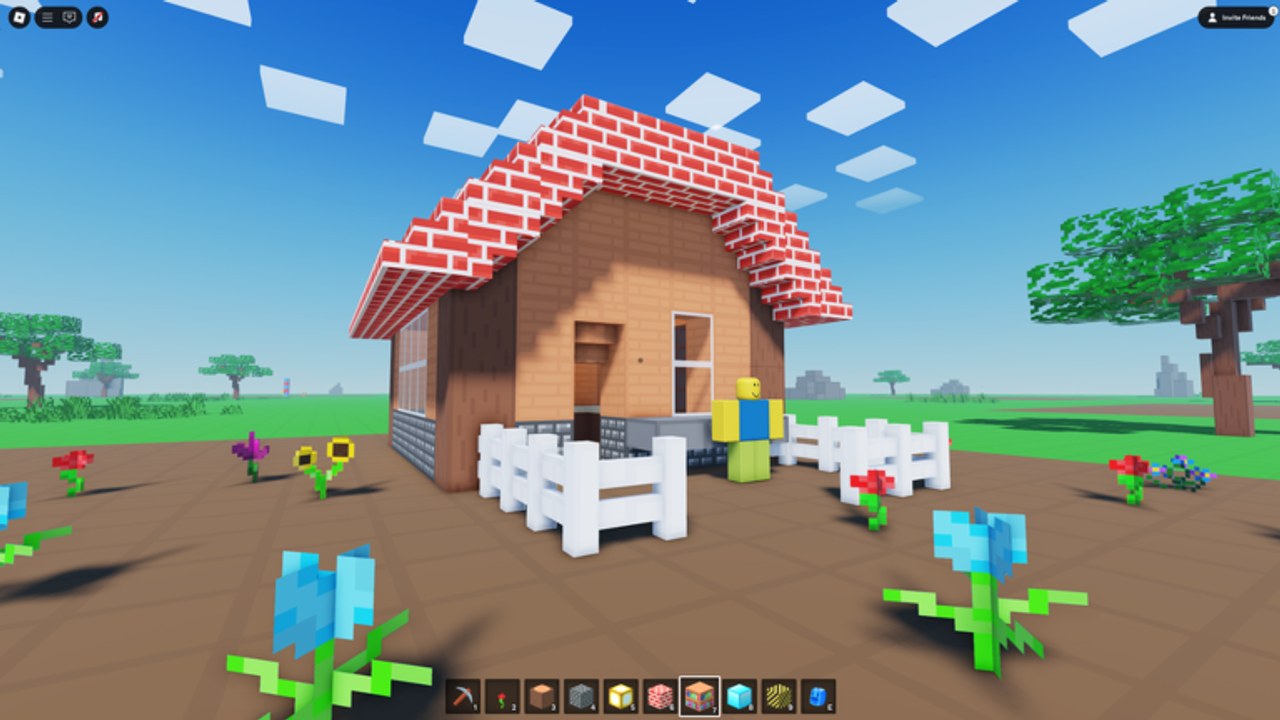
Blank plots stall creativity. This Build Ideas guide gives Build with Blocks players concrete themes you can finish on an eight-player server without Robux gates. Every idea uses the same official loop—open inventory, select a block, click or tap to place, mine mistakes with the pickaxe—and pairs with Building Tips for silhouette and palette discipline.
The embedded video shows a house idea on Voxel Block Builder, the Goober Labs sibling title. Treat it as massing inspiration: walls, roofs, and courtyard rhythm transfer even when menus differ. Keep building on place 78287218060484 so your plot actually saves.
How to pick an idea fast
- Decide the job of the plot: solo showcase, café roleplay, friend hangout, or skyline flex.
- Cap the palette at two structural colors plus one accent (tier list).
- Timebox the first shell to 30–45 minutes using Getting Started habits.
- Leave a doorway gap and a pathway—doors are coming from the Voxel pipeline (Doors Update).
- Screenshot before experiments so plot saves anxiety never erases progress you cannot rebuild.
Idea 1 — Starter cottage (beginner)
Footprint: 7×5 foundation. Walls: one structural material, two blocks high plus a roof lip. Entrance: 2-wide mined gap facing the walkway. Interior: bed corner, storage niche, tiny window recesses.
Finish with a dirt path from plot edge to door and one planter accent. This cottage teaches placement rhythm from How to Build without overwhelming the inventory.
Idea 2 — Corner café (roleplay favorite)
Footprint: 8×6 L-shape or rectangle with a counter line. Zones: queue path, counter, two seat pads, back storage. Palette: warm wood structure, soft accent trim.
Hosts should read Roleplay Tips so guests know where to stand. Keep the front wall mostly windows (mined openings) so the café reads from the plaza.
Idea 3 — Lookout tower
Footprint: 3×3 or 4×4 core with spiral or switchback stairs mined as recesses. Height: stop when the silhouette still reads on mobile cameras (Mobile Play). Add a flat observation deck and railing lip.
Towers flex height variation tip from Building Tips. Avoid solid neon shafts that lag phones.
Idea 4 — Garden courtyard
Leave the center empty. Ring the plot with low walls, pathway loops, and planter clusters. Add a tiny shed in one corner for tool RP. Courtyards photograph well and reserve space for weekly block drops listed on Updates.
Idea 5 — Market stall row
Three 3×3 stalls with shared rear wall and distinct roof colors. Great for multi-friend servers: each player claims a stall. Use Players etiquette so nobody mines a neighbor’s awning.
Idea 6 — Pixel mural wall
Build a flat rear wall as a billboard and paint a simple crest or emoji-free icon with contrasting blocks. Keep the mural secondary so the house silhouette still wins. Mine mistakes cleanly with How to Mine.
Idea 7 — Split-level home
Raise half the foundation by one block to create a living step. Put social seats on the low side and private rooms on the high side. Split levels feel premium without rare materials.
Idea 8 — Mini museum / gallery
Long hall, left and right pedestals, skylight strips. Display new weekly blocks on pedestals the day they drop. Redeem anything from Codes into the gallery first.
Idea 9 — Chill lounge with stage
Open floor, low stage platform, backdrop wall, and seat rows. Perfect for music or comedy RP on voice-enabled parties. Keep pathways wide for eight players.
Idea 10 — Compact castle gate
Two towers, connecting wall, arched mined gate, and a small courtyard behind. Classic skyline flex that still fits a personal plot. Prep the gate opening for future door props.
Session recipes
15 minutes: cottage foundation + path. 30 minutes: café shell + counter. 60 minutes: tower or castle gate with deck. Always end by mining stray studs and taking three screenshots (front, side, top).
Themes to avoid early
- Full-plot mega cities that never finish
- Flicker-heavy neon forests on mobile
- Exact 1:1 copies of unrelated games that confuse plot purpose
- Builds that block the public walkway outside your claim
Sibling inspiration without confusion
Goober Labs also runs Voxel Block Builder (roller coasters, doors already live) and Build with Bricks. Ideas travel; save files do not. Compare studios on the Voxel Block Builder page, then return here to place on your Build with Blocks plot.
After you finish a shell
- Rejoin once to confirm the plot loaded (Plot Saves).
- Invite one friend for feedback via Players.
- Skim Updates for new materials that upgrade roofs or trim.
- Rank what you used on the tier list so the next idea starts stronger.
Creativity compounds. Finish small themes, iterate weekly, and let Goober Labs drops fill the shelves you left empty on purpose.
Frequently Asked Questions
Quick answers for Build with Blocks players.
Which build idea is best for brand-new players?
Start with the starter cottage: a 7×5 shell teaches placement without overwhelming your first session.
Can I copy Voxel Block Builder houses into Build with Blocks?
You can reuse silhouettes and room layouts as inspiration. Builds do not transfer between experiences—rebuild on your plot.
What should I build for roleplay?
Corner cafés, lounges, and market stall rows give clear zones for guests. See Roleplay Tips for hosting rules.
How do I keep ideas mobile-friendly?
Prefer chunky forms, limited neon, and readable silhouettes. Details live in Mobile Play.